AWS Automation · Containment · Self-Hosted

Detect. Contain. Roll it back.

AWS Cloud Governance is a self-hosted, serverless AWS platform for event-driven automation and reversible containment. Map your cloud inventory, explore CloudTrail activity by actor, and build detection rules and runbooks that contain principals or remediate resources — every action reversible, with a full execution history, entirely within your own AWS account.

No credit card required · Cancel anytime

Deploy to AWS Console — opens new tab
Or deploy via AWS CLI
$ aws cloudformation deploy \
  --template-url https://threat-reactions-source-us-east-1.s3.us-east-1.amazonaws.com/customer_template.yaml \
  --stack-name aws-cloud-governance \
  --capabilities CAPABILITY_NAMED_IAM

Every AWS Cloud Governance capability

Inventory, investigation, detection, automated response and reversible containment — without any third-party dependencies.

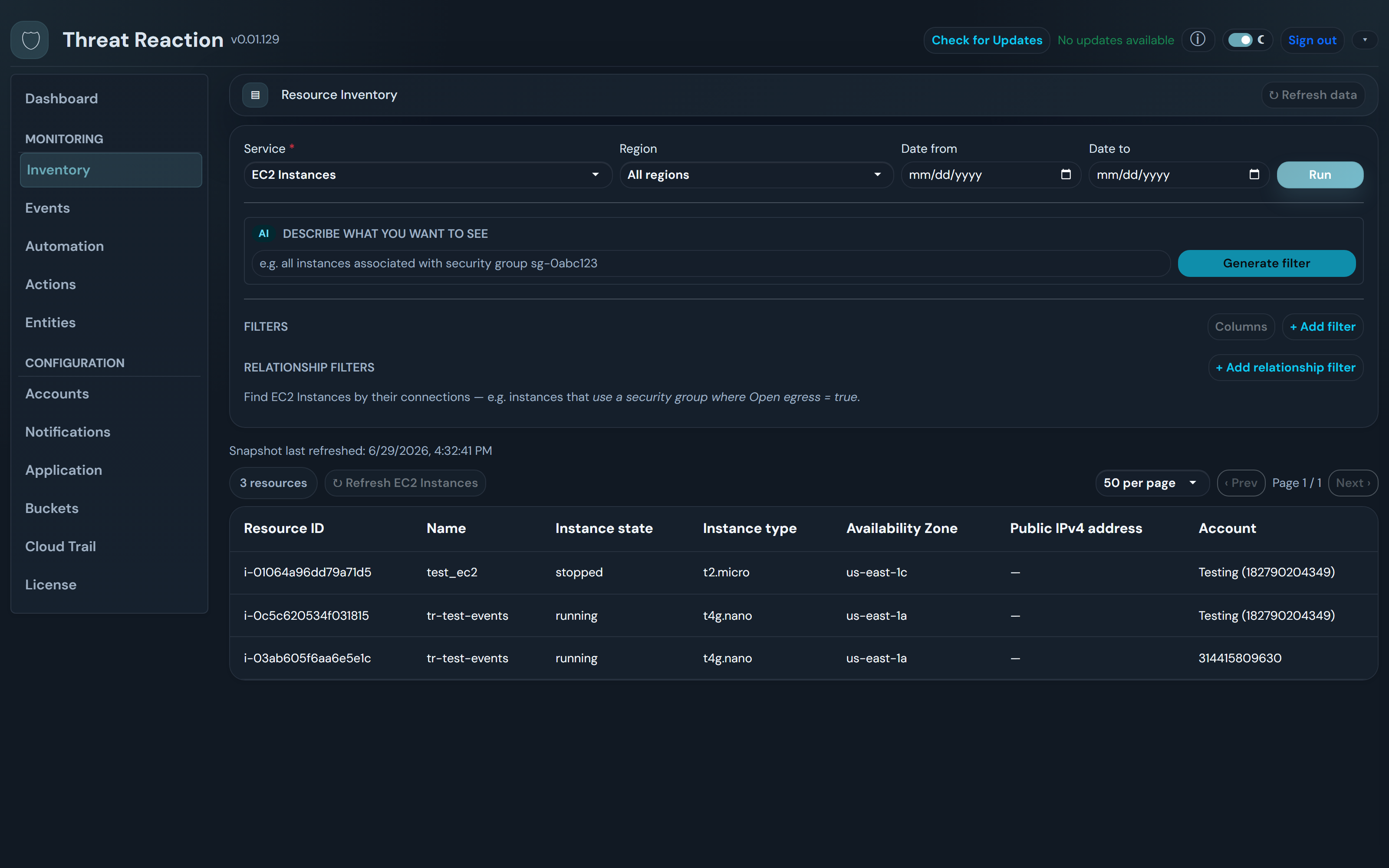
Cloud Inventory Graph

Inventory

Continuously collect your AWS resources into a queryable graph across accounts and regions. Filter in plain English, or walk relationships — an instance's security groups, a subnet's instances, a role's activity.

  • Natural-language filter generation
  • Relationship (multi-hop) queries between resources
  • Per-service catalog, extended without code
  • Snapshots you can query and compare
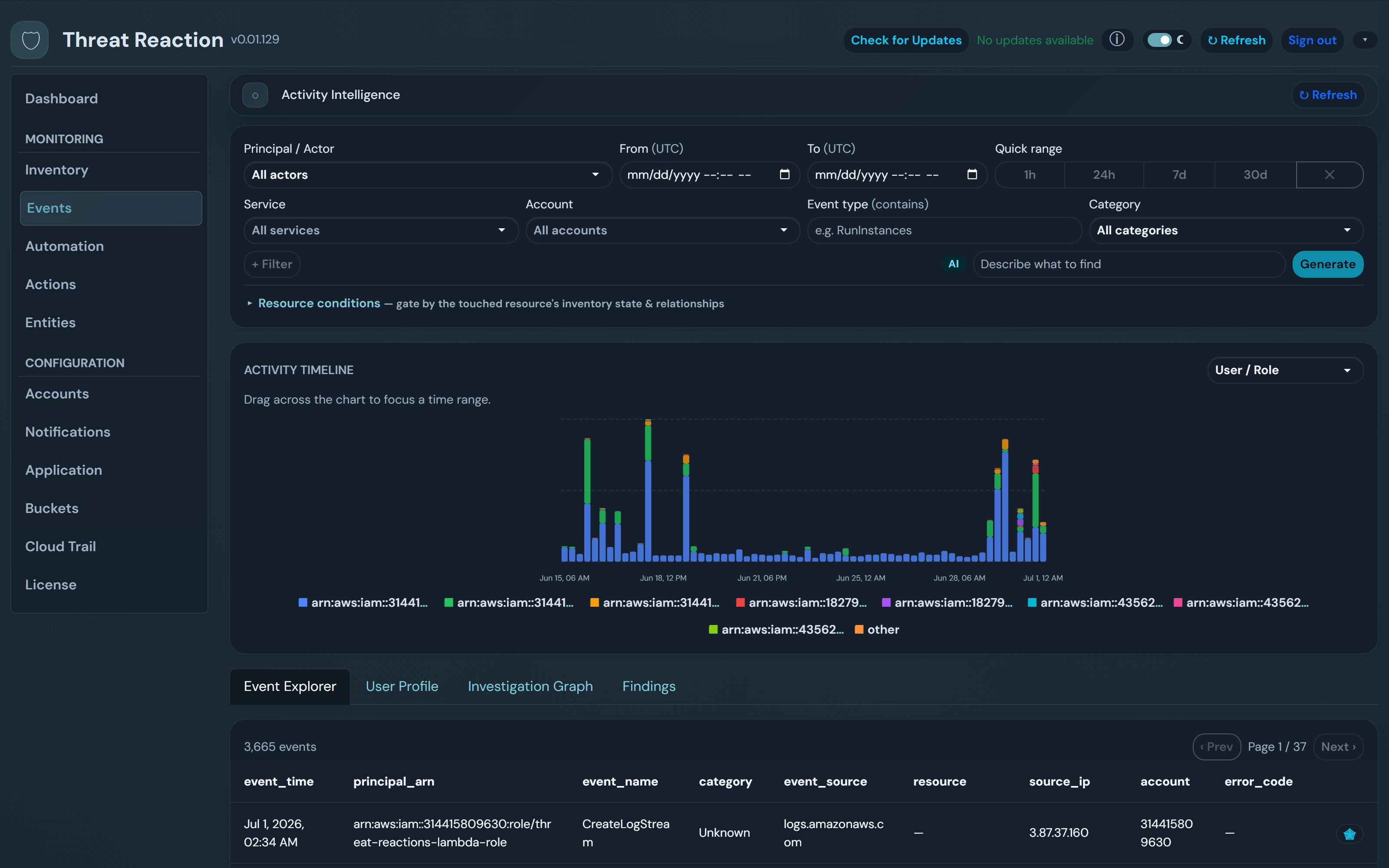
Actor-Centric Events

Investigation

Every CloudTrail event, organized by the identity behind it. Timelines, per-actor profiles, and an activity graph turn investigation into a few clicks instead of a log grep.

  • All CloudTrail activity, grouped by actor
  • Timeline, explorer, profile and graph views
  • Natural-language event filters
  • Actor → touched-resources mapping

Detection Templates & Rules

Automation

Reusable detection templates (field match, threshold windows, sequences) become rules scoped to accounts, regions and filters. Rules evaluate the event stream in real time.

  • Field-match, threshold-window and sequence detectors
  • Scope by account, region, resource and filters
  • Inventory-gated: act only when resource conditions match
  • Versionable, no-code configuration

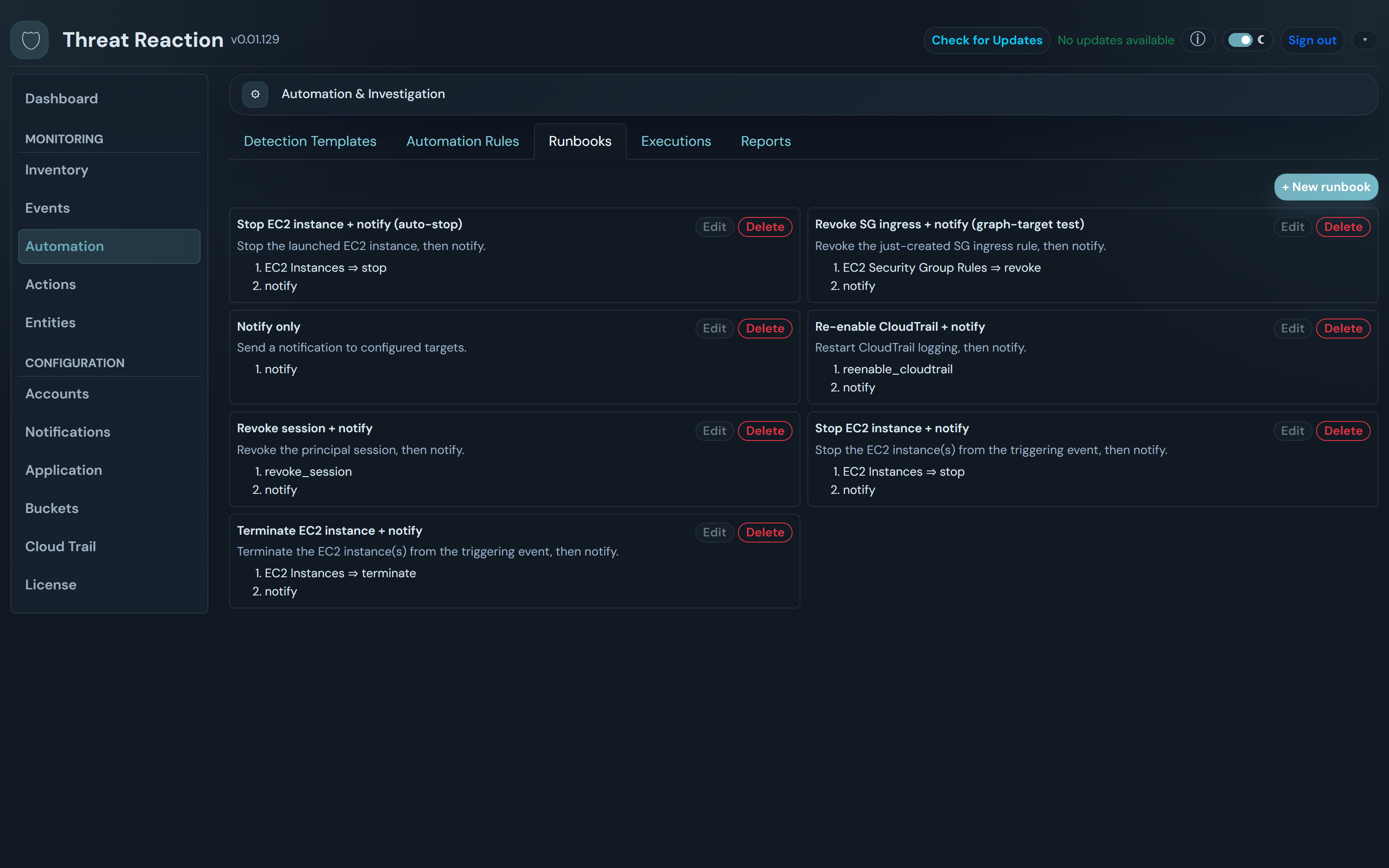
Runbooks

Automation

Chain the response as an ordered set of actions: notify, contain a principal, stop or terminate an instance, revoke a security-group ingress rule — driven from the catalog, targeting the event's own resource or graph-related ones.

  • Ordered, composable action steps
  • Notify with a one-click containment link
  • Resource remediation via the service catalog
  • Graph-relative targeting of related resources

One-Click & Automated Containment

Response

Contain a compromised IAM user or role automatically when a rule fires, or with a single click from the alert email (link valid 24h, single-use). Cross-account containment via a scoped, least-privilege role.

  • Automated containment from any runbook
  • One-click contain link in the notify email (24h, single-use)
  • Cross-account via a scoped ContainmentAutomationRole
  • Same-account principals contained in place

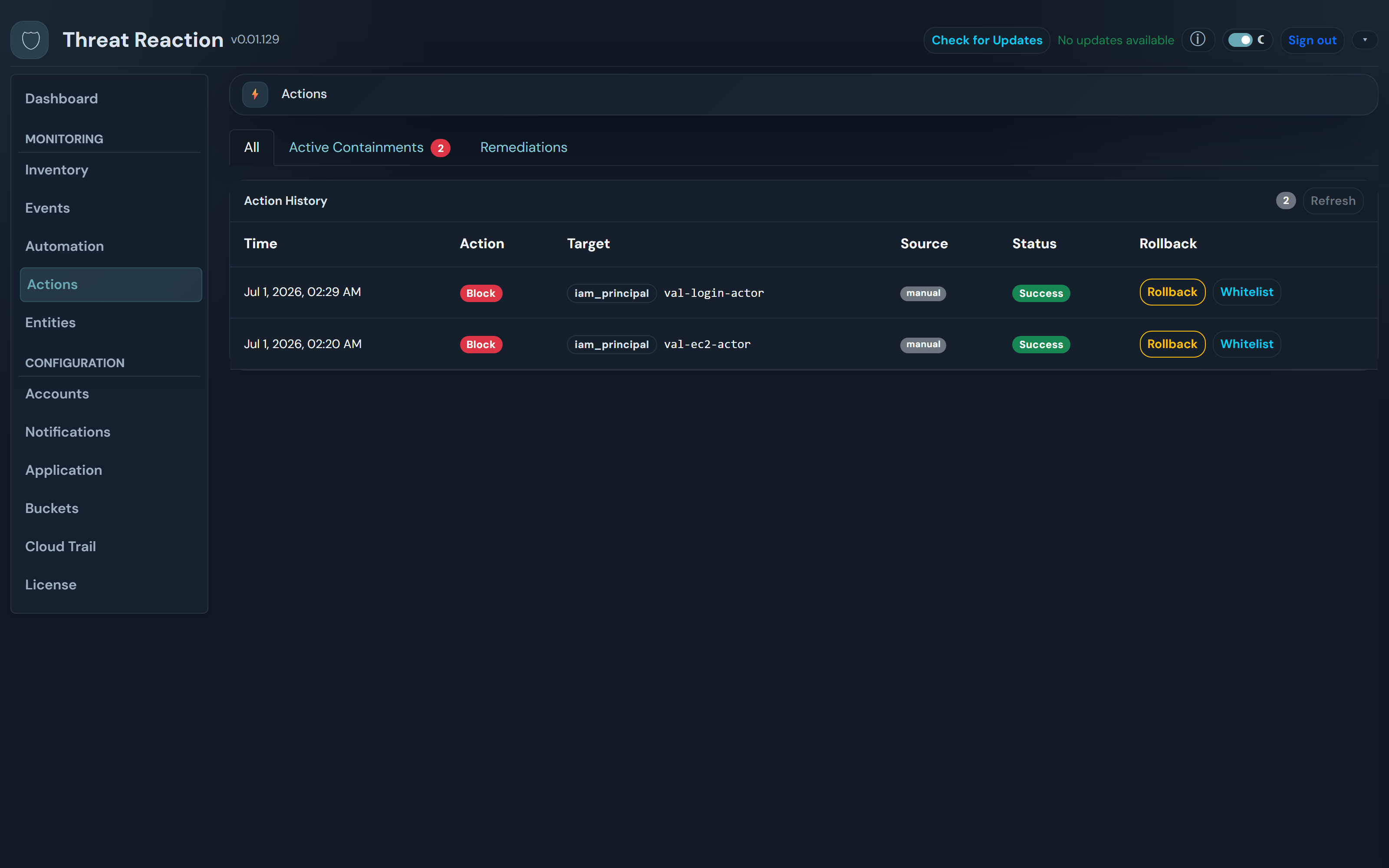
Reversible Actions & Execution History

Control

Every action records the inverse needed to undo it. One unified Actions log shows what happened, who did it, and a Rollback button whenever an action is reversible — plus a full execution history for every rule run.

  • Roll back a block, restart an instance, re-authorize a rule
  • Unified action log with source and status
  • Active-containments filter over the same history
  • Per-run execution records with investigation reports

Fully Self-Hosted on AWS

Architecture

Every component deploys into your own AWS account via a single CloudFormation template. No data ever leaves your perimeter, and no vendor has access to your inventory, events or actions.

  • One-command CloudFormation deploy
  • All resources in your account
  • CloudFront + S3 for the static frontend
  • API Gateway + Lambda backend
  • Cognito auth — admin-provisioned accounts, optional TOTP MFA

GuardDuty Integration

Integration (optional)

Optional. If you already run AWS GuardDuty, its findings flow in via EventBridge and can trigger the same rules and runbooks. Not required — inventory, events, automation and containment all work without it.

  • Optional — enable only if you use GuardDuty
  • Findings routed via EventBridge
  • Drive the same rules and runbooks
  • Severity surfaced in the UI

See it in action

Inventory, events, automation and reversible containment — one console.

Cloud Inventory
Cloud Inventory
Query resources in plain English and walk relationships across accounts.
Actor-Centric Events
Every CloudTrail action, organized by the identity behind it.
Runbooks
Runbooks
Chain the response: notify, contain, remediate — gated on inventory.
Containment & Rollback
One unified action log — roll back any reversible action.

Architecture at a glance

All serverless. All in your account. One CloudFormation template.

CloudFront + S3
Frontend delivery with OAC
Cognito
Auth & user management
API Gateway v2
HTTP API with JWT authorizer
Lambda (×5)
Event, inventory & API functions
DynamoDB
Config, actions & execution store
EventBridge + SQS
CloudTrail event routing

Up and running in minutes

One CloudFormation template. No third-party dependencies.

  1. 01

    Deploy to Your AWS Account

    A single CloudFormation template provisions everything: Cognito, API Gateway, Lambda, DynamoDB, CloudFront, EventBridge, SQS and SNS.

  2. 02

    Collect Inventory & Stream Events

    Point it at the accounts you own. It builds the resource-graph inventory and streams CloudTrail activity into an actor-centric explorer — no agents, no polling.

  3. 03

    Automate & Contain

    Build detection rules and runbooks, gate them on inventory conditions, and let automation contain or remediate — every action reversible, every run in the execution history.

Everything your security team needs. Nothing you don't.

AWS Cloud Governance is purpose-built for AWS-native security teams who want inventory, investigation, automation and reversible containment in one place — without a commercial SIEM or third-party SaaS.

  • No third-party SaaS — your data stays in your account
  • Serverless — pay only for what you use
  • Cloud inventory graph + actor-centric CloudTrail events
  • Detection templates, rules and runbooks — no code
  • Reversible containment and remediation with full execution history
  • Cross-account containment via a scoped, least-privilege role
  • One-command CloudFormation deployment
100%
Self-hosted
<2s
Event latency
0
Agents required
1-click
Reversible rollback

Frequently asked questions

Common questions about AWS Cloud Governance.

What is AWS Cloud Governance?
AWS Cloud Governance is a self-hosted, serverless AWS platform for event-driven automation and reversible containment. It maps your cloud inventory into a queryable graph, organizes CloudTrail activity by actor, and lets you build detection rules and runbooks that contain principals or remediate resources — every action reversible, with a full execution history — all within your own AWS account.
Does my data leave my AWS account?
No. AWS Cloud Governance is deployed entirely within your own AWS account. Your inventory, CloudTrail events, and action history remain in your environment. Trust Partners does not collect, transmit, or have access to any of your data.
What can automation actually do?
Detection templates and rules evaluate events in real time; runbooks chain the response. Built-in actions include notify (with a one-click containment link), contain/uncontain an IAM user or role, stop/start/terminate an EC2 instance, and revoke/re-authorize a security-group ingress rule. Rules can be gated on inventory conditions (for example, only act if the instance is in a given subnet), and every action is recorded so it can be rolled back.
What does "reversible" mean?
Each action records the inverse needed to undo it. Containing a principal can be rolled back to release it; a stopped instance can be started again; a revoked ingress rule can be re-authorized from the captured rule. The Actions screen shows every action with a Rollback button when it is reversible, and marks it Reverted once undone.
How much does AWS Cloud Governance cost?
AWS Cloud Governance is free. You pay only for the AWS infrastructure it consumes (Lambda invocations, DynamoDB storage, API Gateway requests, etc.). Because it is fully serverless, idle time costs nothing.
Does it support multi-factor authentication?
Yes. AWS Cloud Governance supports TOTP multi-factor authentication via AWS Cognito, configurable at deployment time. Self-signup is disabled — only administrator-provisioned accounts can log in.

Automate the response. Keep the undo button.

Deploy AWS Cloud Governance into your AWS account today. No subscription. No vendor lock-in. Just control.